Formats
GIF vs MP4: Which Format Should You Use? (2026)
Choosing between GIF and MP4 depends on your specific use case. While MP4 is the modern standard for video, offering superior compression and high-definition quality, GIF remains highly popular due to its universal compatibility, instant looping behavior, and simple integration into chat apps and emails. This guide provides a detailed technical comparison to help you choose the right format.
Quick Answer
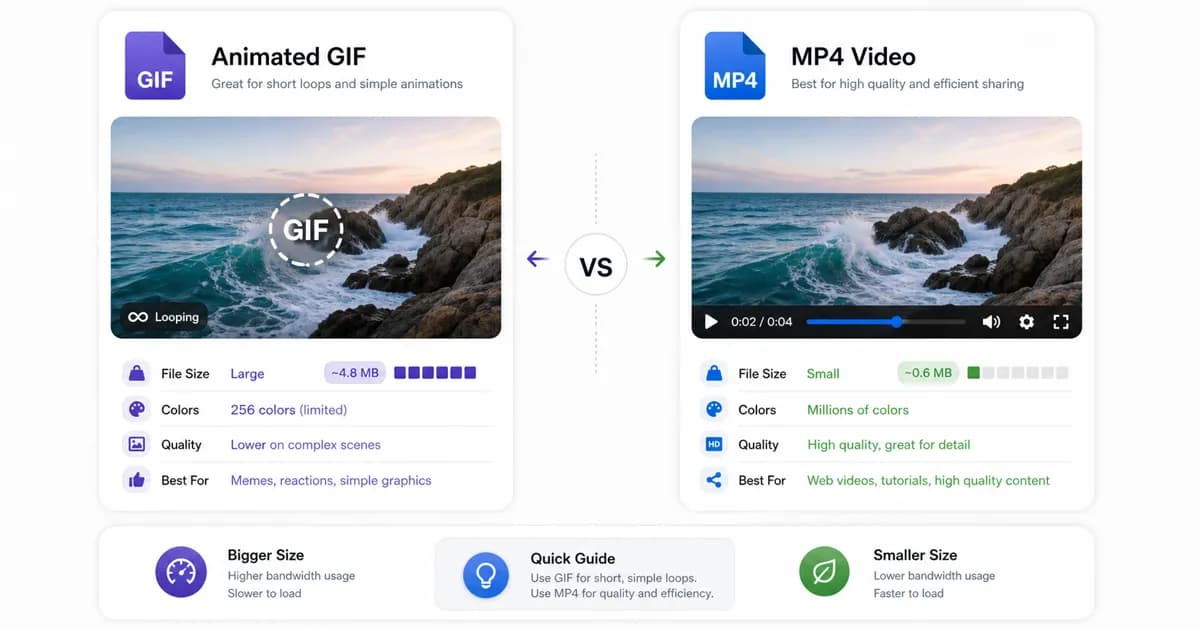
Use the GIF format when convenience, universal compatibility, and instant inline loop playback are your primary goals. Choose MP4 when performance, small file sizes, and high-definition visual quality are essential.
What GIF still does well
Despite being a legacy format originally designed back in 1987, GIF remains a cornerstone of modern digital communication. Its primary advantage is universal compatibility. Almost every operating system, web browser, email client, and messaging application supports GIFs natively. You can drop a GIF into a text thread, attach it to an email newsletter, or upload it to a forum, and it will play automatically without requiring any special media player.
Another key benefit is the user behavior. A GIF is treated as an image, not a video. This means it loops indefinitely, plays silently by default, and does not require the user to click a play button. This instant, zero-friction looping makes GIFs ideal for memes, reaction clips, and quick visual instructions. It has a psychological advantage on social feeds, since users interact with a looping image far more casually than they do with full-fledged video players, which feel like they demand more time and attention.
Additionally, GIFs support simple transparency. While modern formats like WebP or WebM also support transparency, older email clients and legacy platforms still require GIFs to render transparent elements.
Where MP4 wins clearly
From a technical standpoint, MP4 is vastly superior to GIF. The MP4 format uses modern video codecs (such as H.264 or H.265) that compress data highly efficiently. Instead of storing every single frame as an independent image, MP4 uses temporal compression to store only the pixels that change between frames.
This compression efficiency means that an MP4 video will almost always be significantly smaller than an equivalent GIF. For example, a high-quality 5-second animation might be a 15MB GIF, but only a 1.2MB MP4 video. This massive difference in file weight translates directly to faster page load speeds and reduced data consumption.
MP4 also supports true 24-bit color depth, allowing it to display millions of colors without any banding or grain. It also supports audio tracks and variable frame rates, allowing for smooth 60 FPS playback that is impossible to achieve with a GIF.
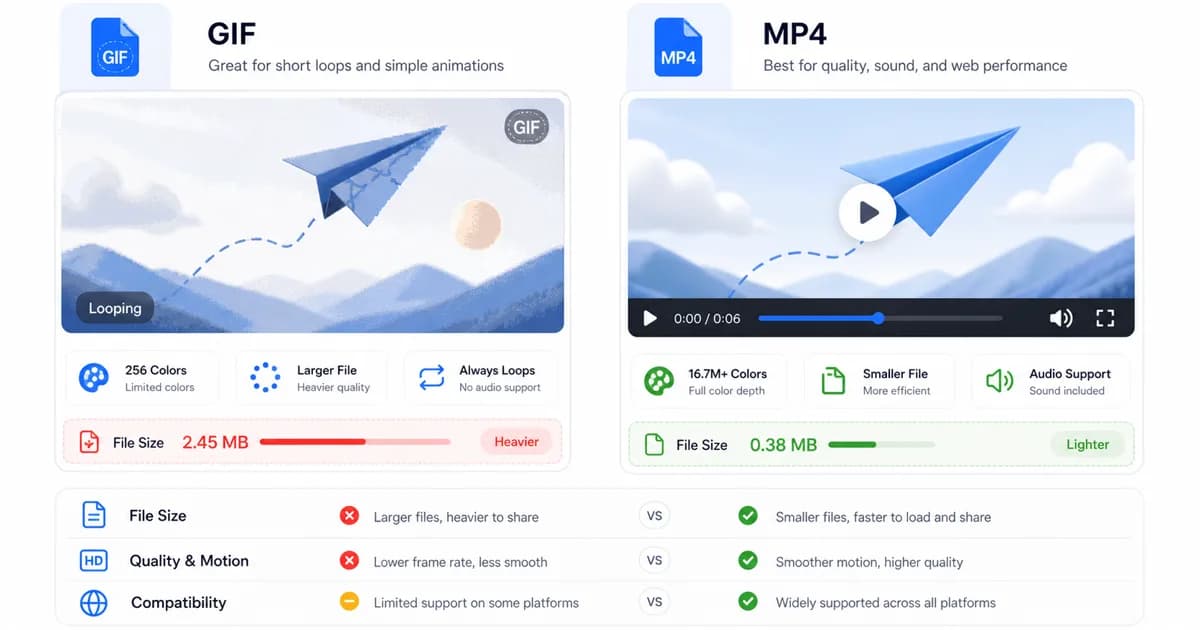
Dynamic rendering and SEO implications of GIF vs MP4
Beyond simple bandwidth concerns, the choice between GIF and MP4 carries heavy search engine optimization (SEO) and user experience consequences. From a web performance perspective, Google's Core Web Vitals audit pages for Largest Contentful Paint (LCP) and Cumulative Layout Shift (CLS). Because GIFs are heavy files, they load slowly over cell connections, delaying the LCP milestone and hurting organic search ranking.
Using MP4 files wrapped in HTML5 `<video>` elements improves load speeds. However, you must handle layout constraints. If a video tag does not declare explicit height and width dimensions, the browser cannot reserve physical screen space before loading the file, triggering a layout shift (CLS) when the media mounts. Additionally, search engine crawlers index standard `<img>` tags containing GIFs directly into image searches, whereas `<video>` elements are processed as media player blocks, which require structured schema markup to rank effectively in video search tabs. Balancing these SEO trade-offs is crucial for modern web development.
To minimize PageSpeed latency, developers should set the `preload="metadata"` attribute on HTML video elements, which prevents the browser from downloading the entire video file until the user initiates playback or the autoplay hook triggers. It is also best practice to supply a high-quality fallback poster image inside the video element container to ensure that the layout remains visually appealing even on slower 3G connections where video loading is delayed. Neglecting to optimize these configurations can result in high bounce rates and lost timeline impressions.
Transparency, autoplay, and practical sharing
When designing web pages, managing user interaction and autoplay behavior is crucial. GIFs autoplay naturally because browsers treat them as static images. For MP4 videos to autoplay, you must configure them carefully in your HTML code by adding the `autoplay`, `loop`, `muted`, and `playsinline` attributes. If you omit the `muted` attribute, modern browsers will block the video from playing automatically.
Transparency is another major consideration. While MP4 does not support transparency, you can use WebP or WebM for transparent web animations. However, if you are designing HTML email campaigns, GIF remains the only format that supports both transparency and animation across all major email clients.
When to pick each format
To guide your decisions, we have compiled a quick reference list of common use cases and the recommended format for each.
As a general rule, use GIF when you are sending quick messages, writing emails, or sharing memes. Use MP4 when you are embedding videos on a website, building product landing pages, or showcasing high-definition content where performance is key.
- Choose GIF for legacy systems, email newsletters, and messaging applications.
- Choose MP4 for video content, web design elements, and high-resolution screen recordings.
- Always mute your MP4 videos to ensure they comply with browser autoplay policies.
- Consider animated WebP as a modern compromise for transparent web animations.
| Platform / Channel | Recommended Format | Primary Reason | Fallback Options |
|---|---|---|---|
| Email Newsletters | GIF | Only format that autoplays natively in standard mail clients. | Static PNG image |
| Chat Apps (Slack, Teams) | GIF | Instantly loops and displays inline without play buttons. | MP4 for longer clips |
| Web Design / Hero Banners | MP4 | Significantly smaller file size, resulting in faster page loads. | WebM for modern browsers |
| Software Documentation | MP4 or GIF | Use MP4 for long screen recordings, GIF for short actions. | WebP for optimized embeds |
Frequently Asked Questions
Why are GIFs still used if MP4 is so much better?
GIFs remain popular because they are treated as images, which allows them to autoplay natively and loop indefinitely across every platform, including email clients, without requiring video player integration or third-party web configurations.
Can you add sound to an animated GIF?
No, the GIF format does not support audio tracks. If you need sound, you must use a video format like MP4.
How do I make an MP4 act like a GIF on my website?
You can make an MP4 look and behave like a GIF by adding specific attributes to your HTML video tag: `<video src="video.mp4" autoplay loop muted playsinline></video>`. The muted attribute is required for autoplay to work.
Is WebP a good replacement for GIF?
Yes, animated WebP is an excellent modern replacement for GIF on websites. It supports full 24-bit color, transparency, and superior compression. However, it is not yet universally supported in all email clients.
Which format is better for mobile data usage?
MP4 is much better for mobile data. Because of its efficient compression, an MP4 file is often 5 to 10 times smaller than a GIF with the same visual content, saving bandwidth for your users.
Ready to try it?
Convert MP4 to GIF free
Trim the clip, choose the best settings, and export locally in your browser.
Open the converter